
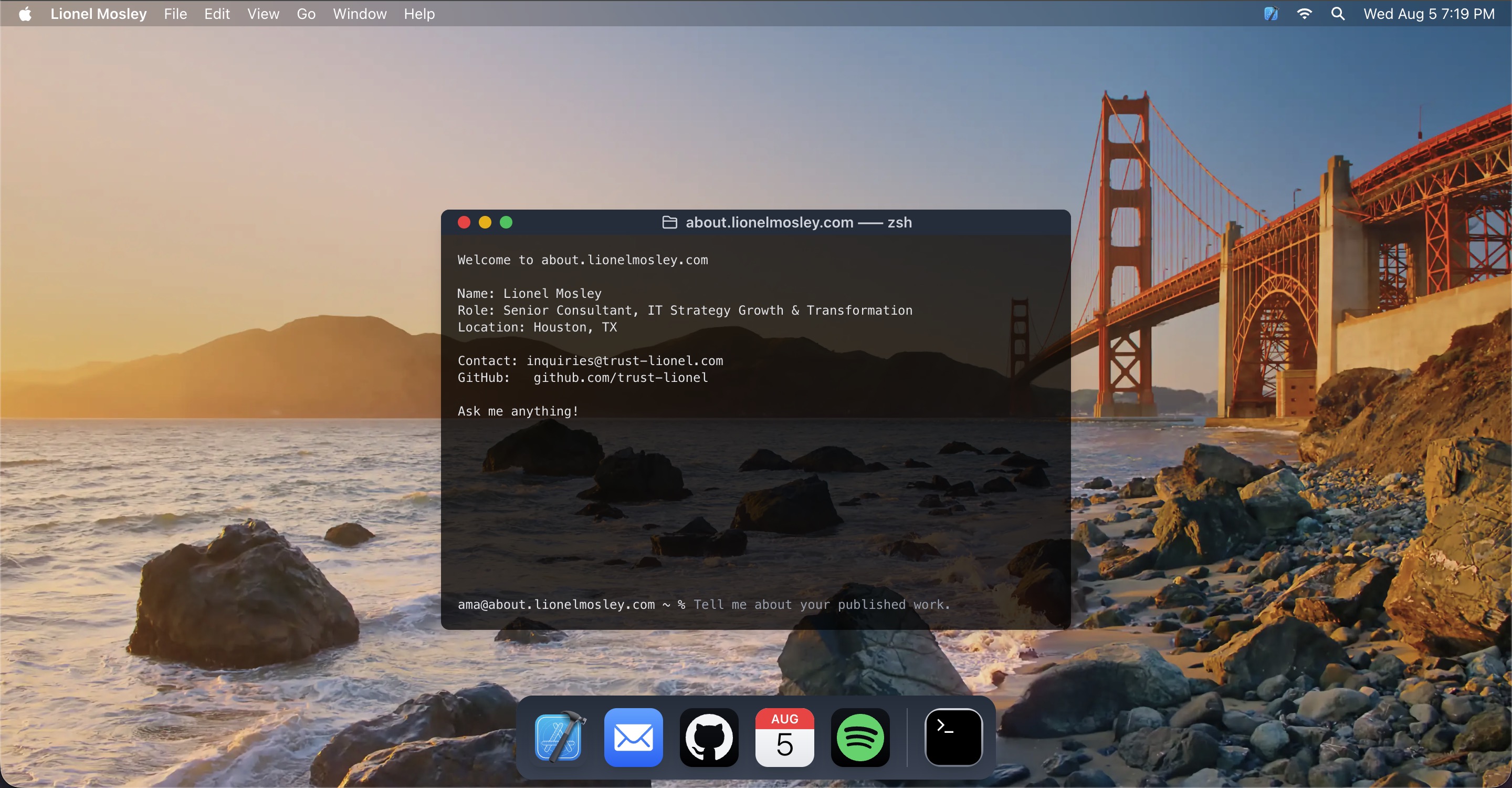
The architecture, design decisions, and consulting philosophy behind the most differentiated property in my digital presence. Built August 5, 2026.
Field Notes — Personal Infrastructure
Every IT consultant has a website. Most of them look the same.
A services list. A credentials block. A contact form. A prospect lands on the page, reads for 90 seconds, and leaves with approximately the same information they could have gotten from a LinkedIn profile — which is to say, not enough to make a decision about whether to spend an hour on a call.
The fundamental problem is that a static page cannot respond to what the visitor actually wants to know. One prospect wants to know if you have done Microsoft 365 migrations at scale. Another wants to understand your position on AI governance. Another wants to know how you approach a cloud repatriation decision. A static biography answers all three with the same content — which means it answers none of them precisely.
I wanted to build something that could respond to the actual question rather than the assumed one.
That decision led to about.lionelmosley.com.
I started building on August 5, 2026 at 8:17 PM CST. This is the engineering story behind what I built — and why every decision was intentional.
01 — The Design Decision: macOS 27 Golden Gateh2
The design is inspired by macOS 27 Golden Gate — Apple’s current design preview, coming this fall.
That sentence requires explanation, because the design choice is not aesthetic decoration. It is a deliberate brand signal that works on multiple levels simultaneously.
macOS 27 Golden Gate introduces an all-new Siri AI powered by Apple Intelligence, enhanced Liquid Glass with more uniform refraction and improved contrast, uniform toolbars, edge-to-edge sidebars, and updated window shapes. At the time this site was built, that OS had not yet shipped to the general public. The aesthetic — the warm California palette, the Golden Gate landmark, the refined design language — was drawn directly from Apple’s preview materials and applied to a browser-rendered interface built from scratch.
The macOS interface is the most recognized professional computing environment in the world. It communicates precision, intentionality, and technical literacy without stating any of those things. A prospect who lands on a page that faithfully reproduces the macOS environment — menu bar, traffic light window controls, dock — immediately understands that whoever built this is comfortable operating at the level of the environment they work in every day.
The design was not reactive. It was anticipatory.
The Golden Gate aesthetic specifically — the landmark that bridges two states, the warm light of the California coast — carries meaning for anyone who works in technology. It is the aesthetic of a platform that takes design seriously enough to name its releases after places. That is the company whose tools I use every day. The design signals that alignment without stating it.
02 — Environment-Aware Designh2
Two elements of the site respond to the visitor’s environment without asking anything of them.
The wallpaper switches automatically between a daytime and nighttime image of the Golden Gate Bridge based on the visitor’s device light or dark mode setting — pulled from System Preferences or Settings with no manual toggle required. A prospect visiting at noon sees a different site than a prospect visiting at midnight. The site responds to its environment. It does not ask the visitor to adapt to it.
The menu bar displays the day, date, and time in the visitor’s local time zone — also pulled directly from their device. The Calendar icon in the dock shows today’s actual date. The site is temporally aware. It knows when it is, and it reflects that accurately.
These are not cosmetic details. They are the same principle behind every infrastructure recommendation I make to clients: the system should adapt to the environment it operates in, not the other way around.
03 — The Terminal: AI Integration, Scope, and Governanceh2
The terminal window in the center of the screen is the most technically significant element of the site — and the one that required the most deliberate governance decisions before a line of code was written.
macOS 27 Golden Gate introduces an all-new Siri AI powered by Apple Intelligence. At the time this site was built, that feature had not yet shipped. The terminal at about.lionelmosley.com is a simulation of that design direction — an OpenAI-powered interface built to the aesthetic and interaction model Apple is moving toward, deployed and governed before the platform itself arrives.
The terminal answers questions about my work, expertise, and services. It is connected to an OpenAI project configured with a specific system prompt and content sourced from my GitHub repository. The prompt bar reflects the zsh shell environment that macOS users recognize immediately.
The governance decisions mattered more than the technical ones.
The terminal’s scope is bounded. It answers questions about my work, my frameworks, my approach to specific problem types, my credentials, and my availability. It does not hallucinate credentials I do not have. It does not make pricing commitments. It does not have access to client data, engagement history, or confidential information. It cannot be prompted into making statements I would not make in a client meeting.
Those boundaries are not technical constraints imposed by the platform. They are governance decisions enforced at the prompt level — the same kind of decisions documented in Module 05 — AI Governance and NIST Alignment.
Deploying an AI interface publicly without a clear scope boundary is not AI integration. It is an unmanaged liability.
Every organization I advise on AI deployment is asking the same questions: where do we deploy it, what scope do we give it, how do we prevent it from doing things we did not intend, and how do we make sure it represents us accurately. The terminal at about.lionelmosley.com is a live, interactive answer to all four of those questions — deployed publicly, at scale, with governance decisions made before the first line of code was written.
A prospect can evaluate my approach to AI governance by interacting with a system I built and deployed under that approach. That is not a portfolio claim. It is a demonstration.
The terminal rewards curiosity. What it reveals to those who explore beyond the obvious is not documented here — and will not be.
04 — The Dock: Navigation as Brand Architectureh2
The five dock icons are not navigation elements dressed up to look like macOS icons. Each one is a deliberate connection between a familiar interface element and a specific destination — chosen because the icon’s meaning in the macOS context matches the destination’s function in the consulting context.
Xcode connects to trust-lionel.com — the ahr-ki-tekt Design Journal. Xcode is a development environment. The journal is where the work gets built in public — frameworks, case studies, technical analysis. The connection is intentional.
Mail opens the visitor’s default email client with my address pre-populated. One click from anywhere on the site to a composed email. Zero friction between interest and contact.
GitHub opens github.com/trust-lionel in a new tab. The work is public and verifiable. The icon signals that immediately.
Calendar shows today’s actual date — pulled live from the visitor’s device — and opens my scheduling page directly. Not a contact form. Not a general inquiry page. A booking link. The message is clear: engagement begins with a scheduled conversation.
Spotify opens my Productivity Workday playlist directly — or launches the Spotify app if it is installed on the device. It is the most personal element in the dock, and deliberately so. It tells a prospect something about how I work that no credentials section ever could. Every consultant has credentials. Not every consultant curates a workday playlist and puts it in their dock.
05 — What This Build Actually Demonstratesh2
Anyone can write “AI Integration” in a competencies list. This terminal is a working demonstration of what responsible AI deployment actually looks like — bounded scope, clear purpose, transparent limitations, no sensitive data exposure, a user experience designed around the visitor’s needs rather than the builder’s preferences.
Anyone can write “attention to detail” in a biography. The environment-aware wallpaper, the live clock, the pixel-accurate window rendering, the dock that works exactly as the macOS dock works — these demonstrate it without stating it.
Anyone can write “macOS expertise” on a resume. The site runs on a macOS 27 Golden Gate-accurate interface that most developers — even experienced ones — would not attempt to build from scratch in a browser, for an OS that has not yet shipped.
The build is not a portfolio item. It is a live proof of concept for the standard I apply to client work.
The infrastructure decision that felt easiest to implement — a static about page with a headshot and a contact form — would have communicated exactly the wrong thing about how I approach problems. I chose the harder path because the harder path is more honest. And because the right clients recognize the difference.
06 — The Honest Trade-Offh2
Building this takes time and technical skill that a standard about page does not.
The OpenAI integration requires ongoing prompt maintenance as my work evolves. The environment-aware wallpaper required testing across device types, operating systems, and browsers. The macOS window rendering required solving browser-specific problems that do not appear in any documentation because no one has done this before at this level of fidelity — for an OS that has not yet been released.
None of that complexity is visible to the visitor. That is the point.
For most professionals, a static about page is the right practical choice. The friction is low. The deployment is fast. The result is adequate.
But for a consultant whose practice is built on the argument that infrastructure decisions made for convenience rather than deliberate design compound into problems — building my own professional presence on a static page I set up in an afternoon would be a contradiction I cannot defend.
The site is the argument. The argument has to hold.
07 — Try Ith2
Visit about.lionelmosley.com.
Ask the terminal what cybersecurity frameworks I work with, or how I approach a cloud repatriation decision, or what the Infrastructure Placement Framework covers.
If you are curious enough — and the right prospects always are — you will find what else is there.
Schedule a consultation at 4nb.cloud/lmosley.
No algorithm between us.
Lionel Mosley · trust-lionel.com · ahr-ki-tekt Design Journal · August 2026